
SkyWalking
The skywalking plugin sends distributed traces from APISIX and API7 Gateway to Apache SkyWalking.
SkyWalking uses its native NGINX Lua tracer to provide tracing, topology analysis, and metrics from both service and URI perspectives. The gateway communicates with the SkyWalking server over HTTP.
Tracing adds work to each sampled request. Use sample_ratio to balance trace coverage against that overhead, and use a lower ratio on high-throughput routes when full sampling is unnecessary. Requests that are not selected for sampling skip trace creation, but the performance effect depends on the workload and collector configuration.
Examples
The examples use SkyWalking OAP 11.0.0 with BanyanDB 0.11.0 and Horizon 1.0.0. Start the SkyWalking services in the same environment as the gateway:
Create the network used by the SkyWalking containers:
docker network create gateway-skywalking-netIf the gateway also runs in Docker, set GATEWAY_CONTAINER and connect it to the network. Skip this step for a host-installed gateway:
export GATEWAY_CONTAINER=replace-with-gateway-container-name
docker network connect gateway-skywalking-net "$GATEWAY_CONTAINER"
Create the following Docker Compose file:
services:
  banyandb:
    image: apache/skywalking-banyandb:0.11.0
    command: standalone
    networks:
      - skywalking

  oap:
    image: apache/skywalking-oap-server:11.0.0
    environment:
      SW_STORAGE: banyandb
      SW_STORAGE_BANYANDB_TARGETS: banyandb:17912
    ports:
      - "127.0.0.1:12800:12800"
    depends_on:
      - banyandb
    networks:
      skywalking:
        aliases:
          - skywalking-oap

  horizon:
    image: apache/skywalking-ui:horizon-1.0.0
    environment:
      HORIZON_OAP_QUERY_URL: http://skywalking-oap:12800
      HORIZON_OAP_ADMIN_URL: http://skywalking-oap:17128
      HORIZON_AUTH_LOCAL_USERS: '[{"username":"admin","passwordHash":"$$argon2id$$v=19$$m=65536,t=3,p=4$$eemqy1r72oSXR58y8VpRqw$$Bn/dULrmJTHEi3263KfgWDEwQmUsqNLi3xwyv/DekHM","roles":["admin"]}]'
    ports:
      - "127.0.0.1:8081:8081"
    depends_on:
      - oap
    networks:
      - skywalking

networks:
  skywalking:
    name: gateway-skywalking-net
    external: true
Start the services:
docker compose -f skywalking-compose.yaml up -dHorizon is available at http://localhost:8081. Sign in with username admin and password admin.
caution
The local user in this example uses public demonstration credentials. Use it only for a trusted local evaluation. Configure an identity provider or generate a unique password hash before exposing Horizon outside the local environment.
Create a namespace and a Secret containing the Horizon local-user configuration:
kubectl create namespace skywalking
kubectl create secret generic horizon-auth -n skywalking \
  --from-literal='HORIZON_AUTH_LOCAL_USERS=[{"username":"admin","passwordHash":"$argon2id$v=19$m=65536,t=3,p=4$eemqy1r72oSXR58y8VpRqw$Bn/dULrmJTHEi3263KfgWDEwQmUsqNLi3xwyv/DekHM","roles":["admin"]}]'
Create a values file that pins compatible SkyWalking components and uses BanyanDB for storage:
fullnameOverride: skywalking

oap:
  image:
    tag: 11.0.0
  storageType: banyandb

ui:
  image:
    tag: horizon-1.0.0
  envFromSecret: horizon-auth

elasticsearch:
  enabled: false

banyandb:
  enabled: true
  image:
    tag: 0.11.0
Install the official SkyWalking Helm chart:
helm upgrade --install skywalking oci://docker.io/apache/skywalking-helm \
  --version 5.0.0 \
  --namespace skywalking \
  -f skywalking-values.yaml
The OAP server is available to the gateway at skywalking-oap.skywalking.svc.cluster.local:12800. To access Horizon locally, forward its service port and open http://localhost:8081:
kubectl port-forward -n skywalking service/skywalking-ui 8081:80Sign in with username admin and password admin. Replace the public demonstration credentials with a unique password hash before making Horizon accessible outside the local environment.
For a host-installed gateway, use http://127.0.0.1:12800.
After the SkyWalking OAP server is available, configure the gateway according to how it was deployed. In API7 Gateway, skywalking is available in Dashboard and Admin API by default. For APISIX deployments, load skywalking in the gateway plugin list before setting the endpoint address for the SkyWalking OAP server.
For an APISIX host deployment, keep the existing plugin list in config.yaml, add skywalking, and set plugin_attr.skywalking.endpoint_addr to the OAP port published on the host:
plugins:
  # Keep the complete plugin list used by your gateway.
  - skywalking

plugin_attr:
  skywalking:
    report_interval: 3
    service_name: APISIX
    service_instance_name: APISIX Instance
    endpoint_addr: http://127.0.0.1:12800
Reload the gateway for configuration changes to take effect.
For an APISIX Docker deployment, keep the existing plugin list in config.yaml, add skywalking, and use the OAP container alias on the shared network:
plugins:
  # Keep the complete plugin list used by your gateway.
  - skywalking

plugin_attr:
  skywalking:
    report_interval: 3
    service_name: APISIX
    service_instance_name: APISIX Instance
    endpoint_addr: http://skywalking-oap:12800
Reload the gateway for configuration changes to take effect.
For Helm deployments, update the values that render the SkyWalking plugin attributes. For APISIX, also update the value that renders the gateway plugin list. Keep the rest of your values file unchanged.
For the APISIX Helm chart, apisix.plugins replaces the loaded plugin list. Start from the complete plugin list used by your gateway, add skywalking, and configure the plugin attributes under apisix.pluginAttrs:
apisix:
  plugins:
    # Keep the complete plugin list used by your gateway.
    - skywalking
  pluginAttrs:
    skywalking:
      report_interval: 3
      service_name: APISIX
      service_instance_name: APISIX Instance
      endpoint_addr: http://skywalking-oap.skywalking.svc.cluster.local:12800
For the API7 Gateway Helm chart, set the following values:
pluginAttrs:
  skywalking:
    report_interval: 3
    service_name: APISIX
    service_instance_name: APISIX Instance
    endpoint_addr: http://skywalking-oap.skywalking.svc.cluster.local:12800
Then apply the values file with the chart used for this gateway release:
helm upgrade <release-name> <chart-name> -n <namespace> -f values.yamlTrace All Requests
The following example traces every request passing through a route.
Create a route with skywalking and configure the sampling ratio to be 1 to trace all requests:
curl "http://127.0.0.1:9180/apisix/admin/routes" -X PUT \
  -H "X-API-KEY: ${ADMIN_API_KEY}" \
  -d '{
    "id": "skywalking-route",
    "uri": "/anything",
    "plugins": {
      "skywalking": {
        "sample_ratio": 1
      }
    },
    "upstream": {
      "nodes": {
        "httpbin.org:80": 1
      },
      "type": "roundrobin"
    }
}'services:
- name: httpbin
labels:
docs-example: skywalking-tracing
routes:
- uris:
- /anything
name: skywalking-route
plugins:
skywalking:
sample_ratio: 1
upstream:
type: roundrobin
nodes:
- host: httpbin.org
port: 80
weight: 1Preview the changes to services with the example label:
adc diff -f adc.yaml \
  --include-resource-type service \
  --label-selector docs-example=skywalking-tracing
Synchronize the reviewed changes:
adc sync -f adc.yaml \
  --include-resource-type service \
--label-selector docs-example=skywalking-tracingapiVersion: v1
kind: Service
metadata:
namespace: aic
name: httpbin-external-domain
spec:
type: ExternalName
externalName: httpbin.org
---
apiVersion: apisix.apache.org/v1alpha1
kind: PluginConfig
metadata:
namespace: aic
name: skywalking-plugin-config
spec:
plugins:
- name: skywalking
config:
sample_ratio: 1
---
apiVersion: gateway.networking.k8s.io/v1
kind: HTTPRoute
metadata:
namespace: aic
name: skywalking-route
spec:
parentRefs:
- name: apisix
rules:
- matches:
- path:
type: Exact
value: /anything
filters:
- type: ExtensionRef
extensionRef:
group: apisix.apache.org
kind: PluginConfig
name: skywalking-plugin-config
backendRefs:
- name: httpbin-external-domain
port: 80apiVersion: apisix.apache.org/v2
kind: ApisixUpstream
metadata:
namespace: aic
name: httpbin-external-domain
spec:
ingressClassName: apisix
externalNodes:
- type: Domain
name: httpbin.org
---
apiVersion: apisix.apache.org/v2
kind: ApisixRoute
metadata:
namespace: aic
name: skywalking-route
spec:
ingressClassName: apisix
http:
- name: skywalking-route
match:
paths:
- /anything
upstreams:
- name: httpbin-external-domain
plugins:
- name: skywalking
enable: true
config:
sample_ratio: 1Apply the configuration to your cluster:
kubectl apply -f skywalking-ic.yamlSend a few requests to the route:
curl -i "http://127.0.0.1:9080/anything"You should receive HTTP/1.1 200 OK responses.
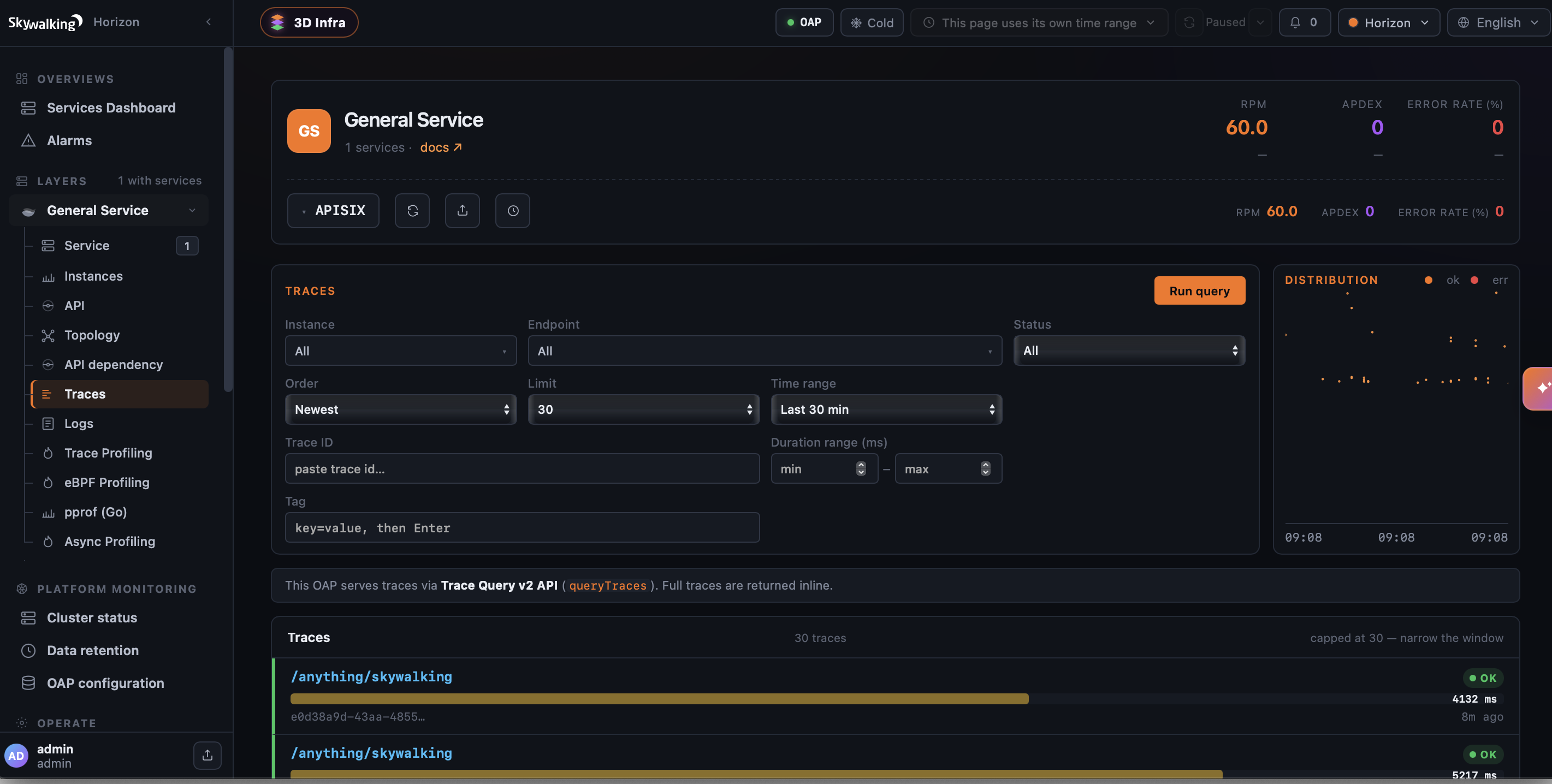
In Horizon, navigate to General Service → Traces and run a query. You should see traces for the APISIX service:
Associate Traces with Logs
The following example sends request logs from a traced route to SkyWalking, allowing Horizon to link each log entry to its trace.
Create a route with the skywalking-logger plugin and configure the plugin with your OAP server URI:
curl "http://127.0.0.1:9180/apisix/admin/routes" -X PUT \
  -H "X-API-KEY: ${ADMIN_API_KEY}" \
  -d '{
    "id": "skywalking-logger-route",
    "uri": "/anything",
    "plugins": {
      "skywalking": {
        "sample_ratio": 1
      },
      "skywalking-logger": {
        "endpoint_addr": "http://skywalking-oap:12800"
      }
    },
    "upstream": {
      "nodes": {
        "httpbin.org:80": 1
      },
      "type": "roundrobin"
    }
}'services:
- name: httpbin
labels:
docs-example: skywalking-tracing
routes:
- uris:
- /anything
name: skywalking-logger-route
plugins:
skywalking:
sample_ratio: 1
skywalking-logger:
endpoint_addr: "http://skywalking-oap:12800"
upstream:
type: roundrobin
nodes:
- host: httpbin.org
port: 80
weight: 1Preview the changes to services with the example label:
adc diff -f adc.yaml \
  --include-resource-type service \
  --label-selector docs-example=skywalking-tracing
Synchronize the reviewed changes:
adc sync -f adc.yaml \
  --include-resource-type service \
--label-selector docs-example=skywalking-tracingapiVersion: v1
kind: Service
metadata:
namespace: aic
name: httpbin-external-domain
spec:
type: ExternalName
externalName: httpbin.org
---
apiVersion: apisix.apache.org/v1alpha1
kind: PluginConfig
metadata:
namespace: aic
name: skywalking-logs-config
spec:
plugins:
- name: skywalking
config:
sample_ratio: 1
- name: skywalking-logger
config:
endpoint_addr: "http://skywalking-oap.skywalking.svc.cluster.local:12800"
---
apiVersion: gateway.networking.k8s.io/v1
kind: HTTPRoute
metadata:
namespace: aic
name: skywalking-route
spec:
parentRefs:
- name: apisix
rules:
- matches:
- path:
type: Exact
value: /anything
filters:
- type: ExtensionRef
extensionRef:
group: apisix.apache.org
kind: PluginConfig
name: skywalking-logs-config
backendRefs:
- name: httpbin-external-domain
port: 80apiVersion: apisix.apache.org/v2
kind: ApisixUpstream
metadata:
namespace: aic
name: httpbin-external-domain
spec:
ingressClassName: apisix
externalNodes:
- type: Domain
name: httpbin.org
---
apiVersion: apisix.apache.org/v2
kind: ApisixRoute
metadata:
namespace: aic
name: skywalking-route
spec:
ingressClassName: apisix
http:
- name: skywalking-route
match:
paths:
- /anything
upstreams:
- name: httpbin-external-domain
plugins:
- name: skywalking
enable: true
config:
sample_ratio: 1
- name: skywalking-logger
enable: true
config:
endpoint_addr: "http://skywalking-oap.skywalking.svc.cluster.local:12800"Apply the configuration to your cluster:
kubectl apply -f skywalking-logs-ic.yamlGenerate a few requests to the route:
curl -i "http://127.0.0.1:9080/anything"You should receive HTTP/1.1 200 OK responses.
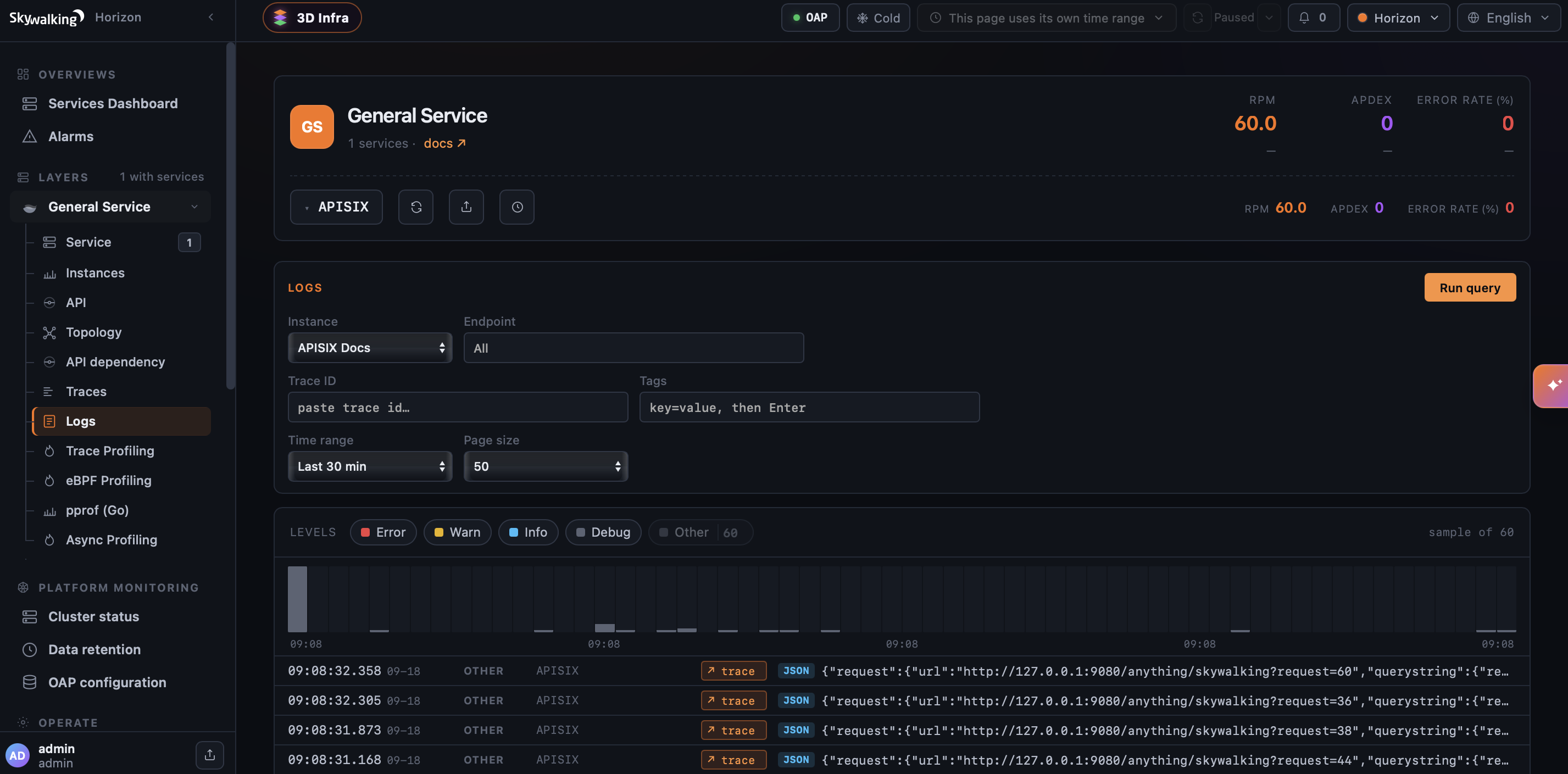
In Horizon, navigate to General Service → Logs and run a query. The correlated request log includes a trace link that opens its trace: